Understanding FEDOF in easifem (Part 2)

FEDOF
Read the part 1 of this series here before proceeding further.
In this note we will study the FEDOF for scalar field using H1 conforming Hierarchical basis functions. The main focus on the degree of freedom associated with vertex, face, and cell of the element.
Mesh related stuff
In this note we will focus on 2D mesh with quadrilateral.

Scalar FEDOF
Initiate the FEDOF object and scalar field by using the following code.
CALL u%ImportFromToml(tomlName="u", fedof=fedof, dom=dom, filename=tomlFileName)
CALL fedof%Display(msg="FEDOF info: ")
Getting all the connectivity
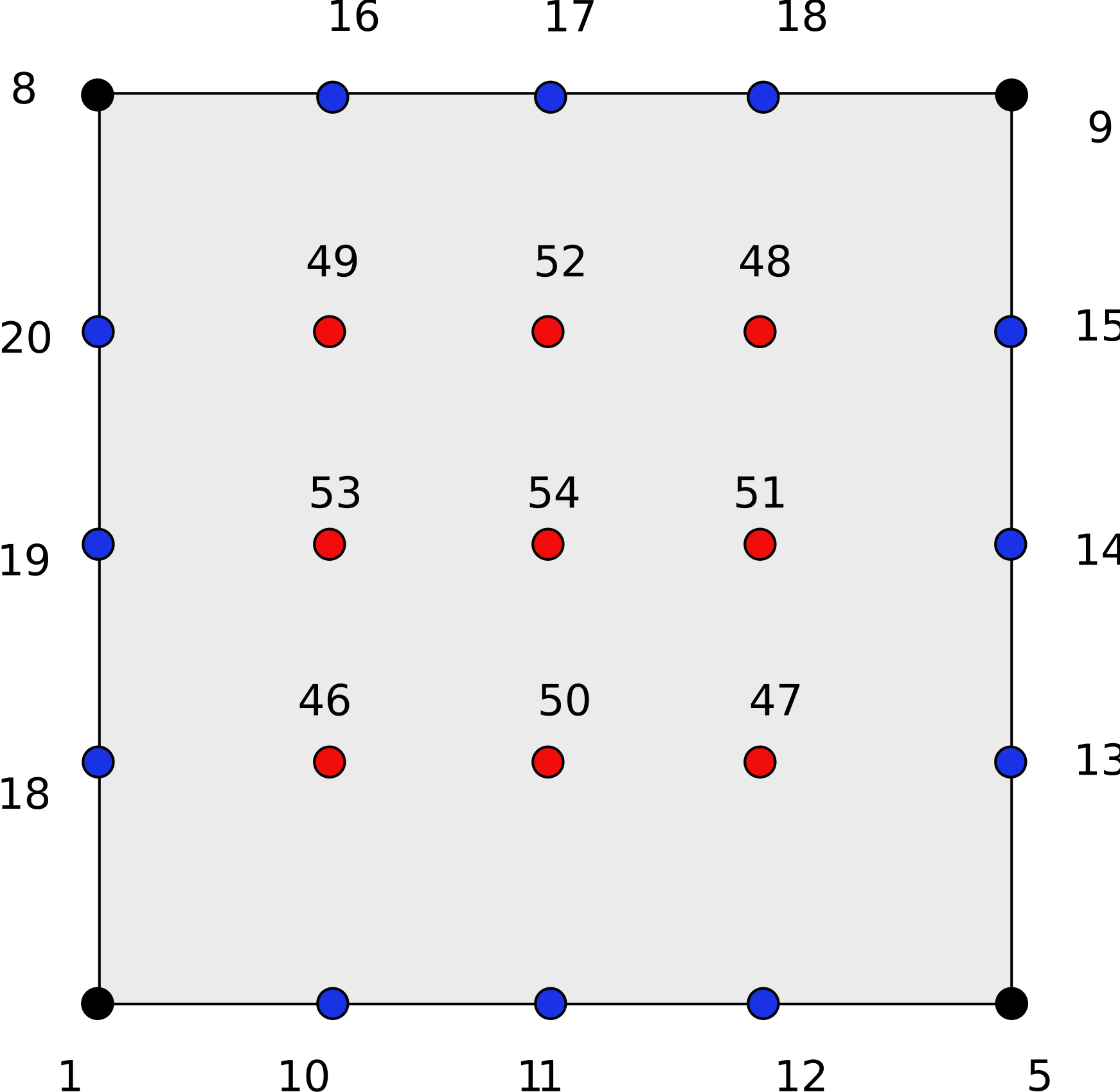
The following code gets all the DOF in an element.
1 5 9 8 10 11 12 13 14 15 16 17 18 19 20 21 46 47 48 49 50 51 52 53 54
Vertex connectivity
Following code gets the vertex DOF connectivity.
nrow = fedof%GetTotalDOF(globalElement=1, islocal=yes, opt="V")
CALL Display(nrow, "Total Vertex DOF for localElement=1:")

con = fedof%GetConnectivity(globalElement=1, islocal=yes, opt="V")
CALL Display(con, "Vertex DOF connectivity for localElement=1:")
1 5 9 8
These are local DOF numbers, and it has nothing to do with the mesh connectivity.
We can get the DOF of a single vertex by using GetVertexDOF() as shown below.
CALL Reallocate(con, 100)
call cellMesh%GetConnectivity_(globalElement=1, islocal=yes, opt="V", ans=con, tsize=tsize)
CALL fedof%GetVertexDOF(globalNode=con(1), islocal=.false., ans=con, tsize=tsize)
CALL Display(con(1), "DOF of vertex 1 of element 1:")
Face connectivity
Following code gets the connectivity of all face DOF in an element. Note that these face DOF are local. In addition, they are related to the positive oriented faces only.
nrow = fedof%GetTotalDOF(globalElement=1, islocal=yes, opt="F")
CALL Display(nrow, "Total Face DOF for localElement=1:")

con = fedof%GetConnectivity(globalElement=1, islocal=yes, opt="F")
CALL Display(con, "Face DOF connectivity for localElement=1:", full=.TRUE., &
             orient="R")
10 11 12 13 14 15 16 17 18 19 20 21
We can get the DOF of a face by using GetFaceDOF() as shown below.
CALL Reallocate(con, 100, isExpand=.TRUE., expandFactor=2)
CALL cellMesh%GetConnectivity_(globalElement=1, islocal=yes, opt="F", &
                               ans=con, tsize=tsize)
nrow = con(1)
CALL fedof%GetFaceDOF(globalFace=nrow, islocal=.TRUE., ans=con, &
                      tsize=tsize)
CALL Display(con(1:tsize), "DOF on face: "//ToString(nrow), full=.TRUE., &
             orient="R")
10 11 12
Getting dof on local face 3 on element 1:
CALL Reallocate(con, 100, isExpand=.TRUE., expandFactor=2)
CALL cellMesh%GetConnectivity_(globalElement=1, islocal=yes, opt="F", &
                               ans=con, tsize=tsize)
nrow = con(3)
CALL fedof%GetFaceDOF(globalFace=nrow, islocal=.TRUE., ans=con, &
                      tsize=tsize)
CALL Display(con(1:tsize), "DOF on face: "//ToString(nrow), full=.TRUE., &
             orient="R")
16 17 18
Cell connectivity
Following code gets the connectivity of cell in an element. Note that these DOFs are local.
nrow = fedof%GetTotalDOF(globalElement=1, islocal=yes, opt="C")
CALL Display(nrow, "Total Cell DOF for localElement=1:")

con = fedof%GetConnectivity(globalElement=1, islocal=yes, opt="C")
CALL Display(con, "Cell DOF connectivity for localElement=1:")
46 47 48 49 50 51 52 53 54
We can get the cell DOF by using GetCellDOF() as shown below.
CALL Reallocate(con, 100, isExpand=.TRUE., expandFactor=2)
CALL cellMesh%GetConnectivity_(globalElement=1, islocal=yes, opt="C", &
                               ans=con, tsize=tsize)
nrow = con(1)
CALL fedof%GetCellDOF(globalCell=nrow, islocal=.FALSE., ans=con, &
                      tsize=tsize)
CALL Display(con(1:tsize), "DOF in cell: "//ToString(nrow), full=.TRUE., &
             orient="R")
46 47 48 49 50 51 52 53 54