Handling Dirichlet Bounding Conditions in easifem (Part 2)

Introduction
Before reading this post, it is recommended to read Handling Dirichlet Bounding Conditions in easifem (Part 1) first.
In this example, Dirichlet boundary conditions is given by a user defined function.
Mesh and degrees of freedom
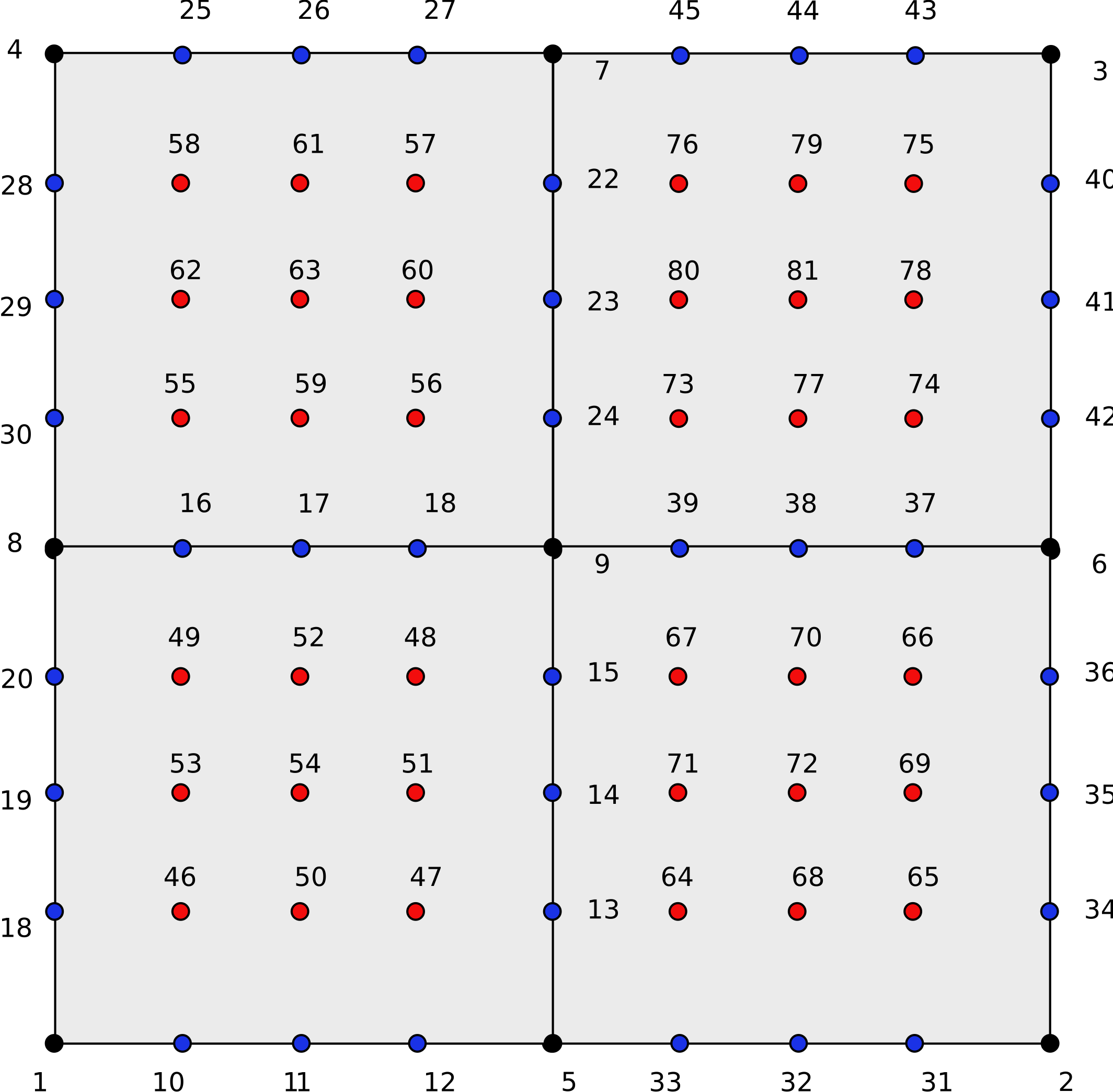
Import from toml
We can initiate an instance of DirichletBC_ by importing the information from a toml-file. To do so, we will use the method called ImportFromToml.
Let us consider the following toml file
[domain]
filename = "./mesh/square_3x3.h5"
group = "/"
totalMedium = 1

[u]
name = "u"
engine = "NATIVE_SERIAL"
fieldType = "Normal"
spaceCompo = 1
timeCompo = 1
fedofName = "space"
geofedofName = "geofedof"

[u.geofedof]
baseContinuity = "H1"
baseInterpolation = "Lagrange"
ipType = "Equidistance"
baseType = "Monomial"

[u.space]
baseContinuity = "H1"
baseInterpolation = "Hierarchical"
# ipType = "Equidistance"
# baseType = "Monomial"
order = 4
scaleForQuadOrder = 2
quadOptName = "quadOpt"

[u.space.quadOpt]
isHomogeneous = true
quadratureType = "GaussLegendre"
# order = 2

[dbc]
name = "Bottom Space UserFunction"
idof = 1
nodalValueType = "Space"
isUserFunction = true

[dbc.function]
name = "func"
returnType = "Scalar"
numReturns = 1
argType = "Space"
numArgs = 3
luaScript = "test2.lua"
luaFunctionName = "BottomFunc"

[dbc.boundary]
isSelectionByMeshID = true

[dbc.boundary.meshID]
line = [1]
We use the following code to import the boundary condition from the above toml file.
!> author: Vikas Sharma, Ph. D.
! date: 2025-10-23
! summary: Study of DirichletBC class

PROGRAM main
USE GlobalData, ONLY: DFP, I4B, LGT
USE ExceptionHandler_Class, ONLY: e, EXCEPTION_INFORMATION
USE DirichletBC_Class
USE FEDomain_Class
USE AbstractMesh_Class
USE FEDOF_Class
USE ScalarField_Class
USE Display_Method
USE ReallocateUtility

IMPLICIT NONE

!----------------------------------------------------------------------------
! Parameters
!----------------------------------------------------------------------------
CHARACTER(*), PARAMETER :: tomlFileName = "./test2.toml"

!----------------------------------------------------------------------------
! Types and variables
!----------------------------------------------------------------------------
TYPE(DirichletBC_) :: obj
TYPE(FEDomain_) :: dom
TYPE(ScalarField_) :: u
TYPE(FEDOF_) :: fedof, geofedof
INTEGER(I4B) :: tsize, iNodeOnNode, iNodeOnEdge, iNodeOnFace, nrow, ncol

!----------------------------------------------------------------------------
! Allocatables and pointers
!----------------------------------------------------------------------------
CLASS(AbstractMesh_), POINTER :: cellMesh, boundaryMesh
INTEGER(I4B), ALLOCATABLE :: nodeNum(:)
REAL(DFP), ALLOCATABLE :: nodalValue(:, :)

!----------------------------------------------------------------------------
! Setting the verbosity
! In Debug mode, there will many messages printed to the screen
! Following code suppress information-exception.
!----------------------------------------------------------------------------

! CALL e%setQuietMode(EXCEPTION_INFORMATION, .TRUE.)

!----------------------------------------------------------------------------
! Domain: Initiate FEDomain and print info
!----------------------------------------------------------------------------

CALL dom%ImportFromToml(tomlName="domain", filename=tomlFileName)
! CALL dom%DisplayDomainInfo(msg="DomainInfo: ")

!----------------------------------------------------------------------------
! ScalarField and FEDOF: Initiate scalarField and fedof
!----------------------------------------------------------------------------

CALL u%ImportFromToml(tomlName="u", fedof=fedof, geofedof=geofedof, dom=dom, &
                      filename=tomlFileName)
! CALL fedof%Display(msg="FEDOF info: ")

!----------------------------------------------------------------------------
! DirichletBC: Import from toml
!----------------------------------------------------------------------------

CALL obj%ImportFromToml(filename=tomlFileName, dom=dom, tomlName="dbc")
! CALL obj%Display("DirichletBC Info: ")

!----------------------------------------------------------------------------
! DirichletBC: Get the total node numbers
!----------------------------------------------------------------------------
tsize = obj%GetTotalNodeNum(fedof=fedof)
CALL Display(tsize, "Total Node Num: ")

!----------------------------------------------------------------------------
! DirichletBC: Get the node numbers
!----------------------------------------------------------------------------

CALL Reallocate(nodeNum, tsize, isExpand=.TRUE., expandFactor=2)
CALL obj%Get(fedof=fedof, nodeNum=nodeNum, tsize=tsize, &
             iNodeOnNode=iNodeOnNode, iNodeOnEdge=iNodeOnEdge, &
             iNodeOnFace=iNodeOnFace)
CALL Display(tsize, "tsize = ")
CALL Display(nodeNum(1:tsize), "nodeNum", full=.TRUE., orient="ROW")
CALL Display(iNodeOnNode, "iNodeOnNode = ")
CALL Display(iNodeOnFace, "iNodeOnFace = ")
CALL Display(iNodeOnEdge, "iNodeOnEdge = ")

!----------------------------------------------------------------------------
! DirichletBC: Get the nodal values
!----------------------------------------------------------------------------

CALL Reallocate(nodalValue, tsize, 2, isExpand=.TRUE., expandFactor=2)
CALL Display(SHAPE(nodalValue), "shape(nodalValue) before Get: ")
nrow = 0; ncol = 0
CALL obj%Get(fedof=fedof, geofedof=geofedof, nodeNum=nodeNum, &
             nodalValue=nodalValue, nrow=nrow, ncol=ncol)

CALL Display(nodeNum(1:nrow), "nodeNum(1:nrow): ", &
             full=.TRUE., advance="NO")
CALL Display(nodalValue(1:nrow, 1:ncol), "nodalValue: ", &
             full=.TRUE.)
CALL Display([nrow, ncol], "[nrow, ncol]: ")

!----------------------------------------------------------------------------
! Cleanup
!----------------------------------------------------------------------------

CALL dom%DEALLOCATE()

END PROGRAM main
We obtain the following information about the boundary condition.
DirichletBC Info
| Property | Value |
|---|---|
| isInit | TRUE |
| name | Bottom Space UserFunction |
| idof | 1 |
| nodalValueType | SPACE |
| isUserFunction | TRUE |
| isUseExternal | FALSE |
Boundary
| Property | Value |
|---|---|
| IsInitiated | TRUE |
| IsSelectionByMeshID | TRUE |
| IsSelectionByElemNum | FALSE |
| IsSelectionByNodeNum | FALSE |
| IsSelectionByBox | FALSE |
Allocation Status
| Element Type | Point | Curve | Surface | Volume |
|---|---|---|---|---|
| MeshID ALLOCATED | FALSE | TRUE | FALSE | FALSE |
| ElemNum ALLOCATED | FALSE | FALSE | FALSE | FALSE |
| NodeNum ALLOCATED | FALSE | FALSE | FALSE | FALSE |
| Box ALLOCATED | FALSE | FALSE | FALSE | FALSE |
Getting Total Node Numbers
To get the total number of nodes where the boundary condition is applied, we can use the method called GetTotalNodeNum.
CALL Display(obj%GetTotalNodeNum(fedof=fedof), "Total Node Num: ")
Total Node Num: 9
Getting Node Numbers
To get the node numbers we call Get method. These node numbers are degrees of freedom numbers for FEDOF. You can use these indices to set and get the values in node fields.
CALL obj%Get(fedof=fedof, nodeNum=nodeNum, tsize=tsize, &
             iNodeOnNode=iNodeOnNode, iNodeOnEdge=iNodeOnEdge, &
             iNodeOnFace=iNodeOnFace)
CALL Display(tsize, "tsize = ")
CALL Display(nodeNum(1:tsize), "nodeNum", full=.TRUE., orient="ROW")
CALL Display(iNodeOnNode, "iNodeOnNode = ")
CALL Display(iNodeOnFace, "iNodeOnFace = ")
CALL Display(iNodeOnEdge, "iNodeOnEdge = ")
              nodeNum
----------------------------------
 1   5   2  10  11  12  31  32  33

iNodeOnNode = 1
iNodeOnFace = 4
iNodeOnEdge = 10
- Node number 1 to 3 are vertex dof numbers.
- Node number 4 to 9 are face dof numbers