7 posts tagged with "mesh"

View All Tags

Understanding FEDOF in easifem (Part 1)

· 7 min read

Vikas Sharma
Assistant Professor, Kyoto University, Japan

FEDOF

FEDOF denotes the finite element degree of freedom. The concept of degree of freedom depends upon the type of finite element approximation (basis functions) used for the problem.

note

These series of notes will present the FEDOF concept for for H1 conforming Hierarchical and Lagrange basis functions.

  • For Lagrange polynomials the degree of freedoms are associatd with the nodes of the mesh. In this case, a node implies a point in the mesh. This point can be a vertex, somewhere on the edge, face, or interior of the element.
  • For Hierarchical polynmials the degree of freedoms are associated with the modes. They can be associated with nodes, edges, faces and interior of the elements. In this case the node has an abstract meaning. But we will associcate them with the vertex, edge, face, and interior basis functions.
  • In the case of H1 conforming basis functions with Hierarchical polynomials, the orientation of edge and faces with respect to the master element is very important. However, for Lagrange polynomials the orientation is not so much needed if we generate the nodes correctly for higher order mesh.

Understanding FEDOF in easifem (Part 2)

· 4 min read
Vikas Sharma
Assistant Professor, Kyoto University, Japan

FEDOF

note

Read the part 1 of this series here before proceeding further.

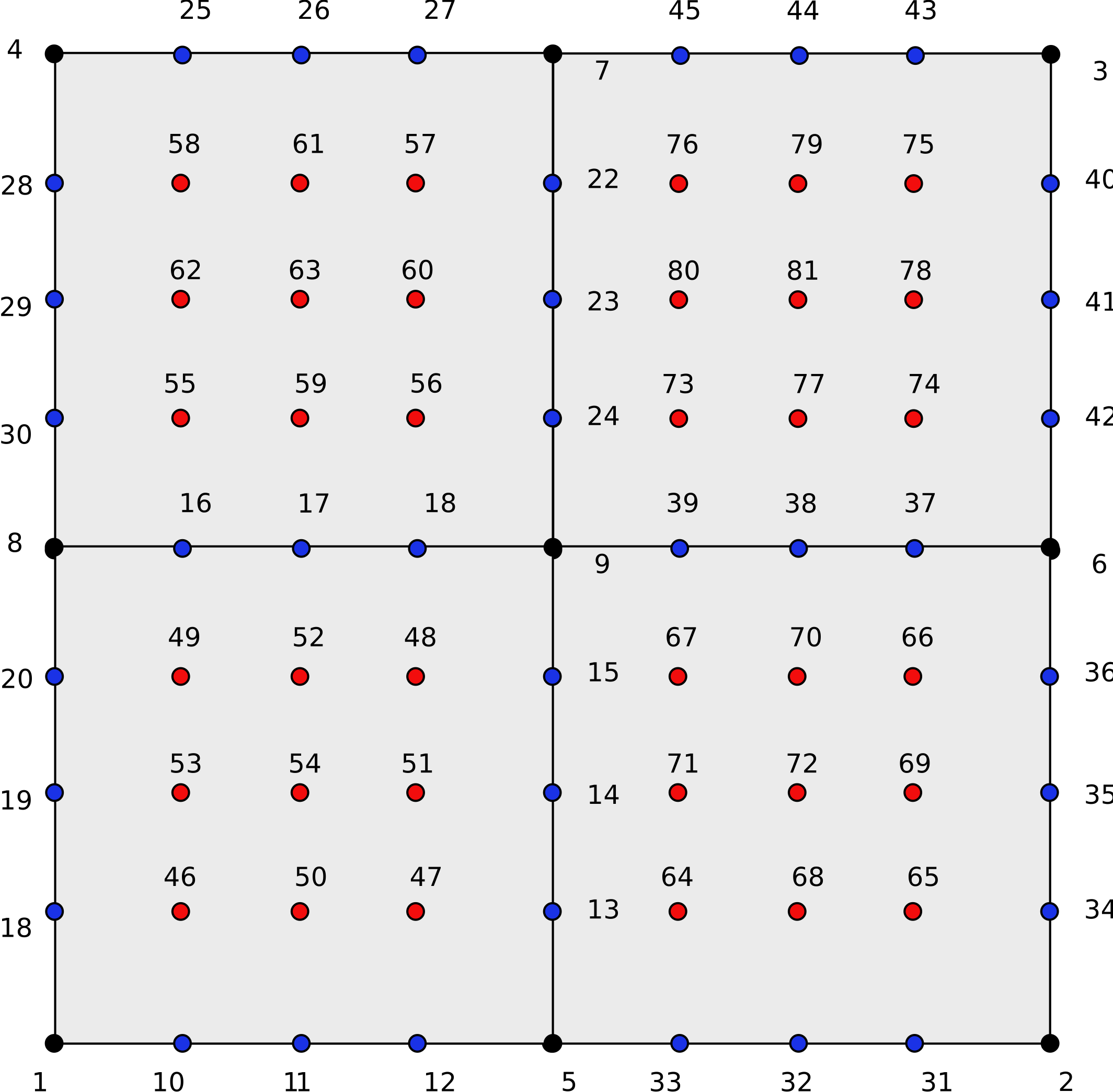
In this note we will study the FEDOF for scalar field using H1 conforming Hierarchical basis functions. The main focus on the degree of freedom associated with vertex, face, and cell of the element.

In this note we will focus on 2D mesh with quadrilateral.

Quadrilateral mesh

Understanding FEDOF in easifem (Part 3)

· 2 min read
Vikas Sharma
Assistant Professor, Kyoto University, Japan

FEDOF

note
  • Read the part 1 of this series here before proceeding further.
  • Read the part 2 of this series here before proceeding further.

In this note we will study the FEDOF for scalar field using H1 conforming Hierarchical basis functions. The main focus is on generating quadrature points and shape functions.

In this note we will focus on 2D mesh with quadrilateral.

Quadrilateral mesh

Handling Dirichlet Bounding Conditions in easifem (Part 1)

· 3 min read
Vikas Sharma
Assistant Professor, Kyoto University, Japan

Introduction

To apply boundary condition in FEM computation, EASIFEM, provides a class called DirichletBC_.

info

DirichletBC_ is a subclass of AbstractBC.

To understand how DirichletBC works, lets consider an example of linear elasticity. Let's say we want to apply the following boundary condition.

u=U0, on Γ\mathbf{u} = \mathbf{U}_{0}, \text{ on } \Gamma

We may think that there is only one boundary condition. But in easifem this is not the case. Actually, u\mathbf{u}, has three components in 3D (and two components in 2D). Therefore, the above boundary condition is actually boundary condition for uxu_x, uyu_y, and uzu_z. So, we have three boundary condition on a given boundary Γ\Gamma.

Creating structured mesh in 2D using EASIFEM

· 4 min read
Vikas Sharma
Assistant Professor, Kyoto University, Japan
Shion Shimizu
Doctoral Student, Kyoto University, Japan

Creating a structured mesh of quadrangles

To create a structured mesh of quadrangles in easifem, we will need following classes:

  • GmshStructuredMesh_Class: This is high-level interface on top of Gmsh library to create structured meshes.
  • Gmsh_Class: Interface to Gmsh library.
  • MSHFile_Class: Reading gmsh files
  • HDF5File_Class: Writing gmsh files to HDF5 file.

Very small mesh of quadrangles

PROGRAM main
USE GmshStructuredMesh_Class
USE Gmsh_Class
USE FPL
USE GlobalData
USE MSHFIle_Class
USE HDF5File_Class

IMPLICIT NONE

TYPE(GmshStructuredMesh_) :: obj
TYPE(Gmsh_) :: gmsh
TYPE(ParameterList_) :: param
! CHARACTER(*), PARAMETER :: title = "small_quad4_mesh"
CHARACTER(*), PARAMETER :: title = "very_small_quad4_mesh"
REAL(DFP), PARAMETER :: pointsOnAxis1(2) = [0.0, 1.0]
REAL(DFP), PARAMETER :: pointsOnAxis2(2) = [0.0, 1.0]

INTEGER(I4B), PARAMETER :: transfinitePointsOnAxis1(1) = [3]
INTEGER(I4B), PARAMETER :: transfinitePointsOnAxis2(1) = [3]

INTEGER(I4B) :: ierr

TYPE(MSHFile_) :: mshFile
TYPE(HDF5File_) :: hdf5file

CALL FPL_Init()
CALL param%Initiate()

CALL SetGmshStructuredMeshParam(param=param, &
filename=title//".msh", &
pointsOnAxis1=pointsOnAxis1, &
pointsOnAxis2=pointsOnAxis2, &
transfinitePointsOnAxis1=transfinitePointsOnAxis1, &
transfinitePointsOnAxis2=transfinitePointsOnAxis2, &
recombineAll=.TRUE.)

CALL obj%Initiate(param)

ierr = gmsh%initialize()
ierr = gmsh%model%add("GmshStructuredMesh2D")
CALL obj%Generate(gmsh)
! ierr = gmsh%fltk%run()
ierr = gmsh%finalize()

CALL param%DEALLOCATE()
CALL obj%DEALLOCATE()

CALL mshFile%Initiate(filename=title//'.msh', STATUS="OLD", ACTION="READ")
CALL mshFile%OPEN()
CALL mshFile%READ()
CALL hdf5file%Initiate(title//'.h5', MODE="NEW")
CALL hdf5file%OPEN()
CALL mshFile%Export(hdf5=hdf5file, group="")
CALL mshFile%DEALLOCATE()
CALL hdf5file%DEALLOCATE()

END PROGRAM main

Handling Dirichlet Bounding Conditions in easifem (Part 1)

· 6 min read
Vikas Sharma
Assistant Professor, Kyoto University, Japan

Introduction

To apply boundary condition in FEM computation, EASIFEM, provides a class called DirichletBC_.

info

DirichletBC_ is a subclass of AbstractBC.

To understand how DirichletBC works, lets consider an example of linear elasticity. Let's say we want to apply the following boundary condition.

u=U0, on Γ\mathbf{u} = \mathbf{U}_{0}, \text{ on } \Gamma

We may think that there is only one boundary condition. But in easifem this is not the case. Actually, u\mathbf{u}, has three components in 3D (and two components in 2D). Therefore, the above boundary condition is actually boundary condition for uxu_x, uyu_y, and uzu_z. So, we have three boundary condition on a given boundary Γ\Gamma.